Monday, June 25, 2012

Secure Yourself

Computer security has been defined as; “The concept of attaining a secure computing environment by mitigating the vulnerabilities associated with computer use.” This statement is applicable to Computers, Web Servers, Networks and even Mobile Devices.

A range of measures may be taken to ensure the security of these aspects of computing, and the following guide will briefly address them. This guide will not hold your hand through everything described. Much of the guide is personal opinion. Keep in mind I do not simply recommend one program for each angle of infection and attack. These are the tips i suggest for a total computer security.
Install and use Anti Virus Program(s)
You need to use antivirus software to protect your own computer, and to prevent your computer from being infected or being used to gain infections to infect others, if you use the internet and don’t take responsibility, you’re going to get infected. If you don’t care about getting infected then look at the financial side of things your system most likely costs around $500 – $1000 and that is just going to be a waste from a stupid infection which you could of easily prevented by using a simple anti virus.
Another-BloodyBlog.blog.com recommends the following anti-virus software:
             

Install and use a firewall program
A firewall is a program that blocks all the information coming through the internet to your network. It will prevent harmful information and software from coming through your private network. A firewall is extremely vital for any home connection, and especially in big workplaces where there are several connections to the internet. This is usually the reason why they limit it to around 20 connections to the FTP server.
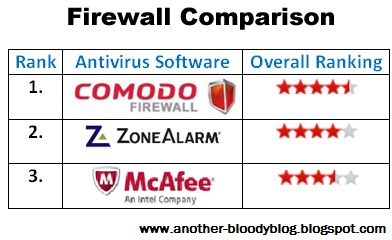
Another-BloodyBlog.blog.com recommends the following firewall software:         
                   
Use strong passwords
Using strong passwords is extremely vital when browsing the net, there is many ways they can hackers can get your password, but the best way to avoid it is not using a common word, or if the hacker knows some information about you he’ll try and guess your password, so you should use something only you know. It doesn’t need to be very long although that is a always recommended a strange word that only you know will do, you could always use generated passwords too but this will only work on certain websites.
Take care when downloading and installing programs
This is the most common way of infecting people. ONLY download a program if you trust the person. I have experienced being infected by this and it’s really common, most files you download that are infected, if you went ahead and downloaded a program and you weren’t sure if it was safe just quickly run a scan on your anti virus and see if there is harmful software or not, try your spy net if again nothing is found it means there is no infected file or the file is FUD (Fully Undetectable). So if you are downloading a program from a forum wait for an OK from an experienced user and go ahead with it if he seems satisfied but that doesn’t 100% mean it’s not, just be careful.
Keep Your System Up To Date
Keeping your system patched and software updated is extremely important. Companies release updates and patches for software to fix any exploits and vulnerabilities, this means if you’re running on an unpatched version, you are vulnerable.
A great website to check whether your software is up to date is www.secunia.com. This scans your system to see whether any software is out of date, if software is, then it provides you with the links to update it.
Once things like Java have been updated, you should always delete the old version. This is because malicious exploitation could still be acted upon.
Reading Emails
While reading emails you should be careful, don’t open attachments unless you know what it is, even if the email is by a friend.
The bigger risk though is phishing emails. A lot of emails can look legit, when they’re not. Even if it says, for example “sent by support@jagex.com” that doesn’t cut the risk of it being a phishing email.
Remember that banks don’t ask you to update your details via email, that games usually don’t either. When clicking a link outgoing from an email ALWAYS remember to check the address in the top of your browser.
Make backups of important things
I’m sure everyone has important files on their PCs. That is why you should back them up, on an additional hard drive, USB or even an online service such as Amazon Cloud.
This ensures that if for example your computer got stolen, broke or something restricts your access to the hard drive. You won’t have to worry, as you have some back ups.
Encrypt Your Files
Encryption of your files protects them, whether someone intrudes your PC online or off, they won’t be able to access those files.
Some good file encryption programs you may want to look into are BitLocker, TrueCrypt.

Malware!!!


Malware has been a big problem today. Malware is short form of malicious software. A malware is a software designed to infect a computer system without owner being informed. Thousands of people have been victims of malware. In this article I will discuss all the types of malware, and give you an example of a Windows Trojan in use. The reason I will use Windows is because malware is very rare in Mac and Linux computers.
Types of Malware Software:
Computer Viruses – A computer virus is a malicious software that is developed to infect a computer. It is designed to spread from one computer to another and to damage a computer hardware, software and files. Once the virus infects a computer, it replicates or reproduces itself. Viruses are like parasites because they need a host to attach themselves to in order to infect a computer.
Worms – A worm is different from a virus because it doesn’t need a person to be able to spread and infect systems. Worms most often take advantage of known bugs in computers to spread. Computer worms are major threats to large networks.
Trojan Horse – A trojan horse is a malicious software that appears to do one thing, but actually does another. It is mostly used to control the victims computer rather than infecting or destroying files on it. Some trojans may be relatively “harmless” to your system, but other trojans pose a far greater effect to your computer. A trojan horse can monitor your internet connection, grab your email addresses, access passwords and more.
Keloggers – A keylogger is a hardware or software device that monitors each keystroke a user types on a specific computer’s keyboard. Once installed, this device will automatically load from the start-up and start capturing each and every keystroke that was typed on the computer. Any person with a basic knowledge of computer can use keylogger. You can check my post “What is Keylogger Software?” for more information related to keyloggers.
Remote Administration Tools – A Remote Administration Tool (also called as RAT) is s a software used to take control of a computer from a remote location. RATs can be used either for legal or illegal purpose. Once the software is installed on a computer the administrator can do almost anything on the remote computer.
Adware and Spyware – Adware (Advertising-supported software) is any software application in which advertising banners are displayed while the program is running. On the other hand, a Spyware is software that sends information from the user’s computer without their knowledge. Spyware programs can collect various types of personal information, such as Internet surfing habit, sites that have been visited etc.
Adware and spyware can bring the computer system to its knees. They are detrimental, lowering the performance of the computer. The victim of these nasties might need to replace data, and might lose unique files.
How Malware Works
To show you an example of a malicious program, I will use a well known Windows Trojan,ProRat. ProRat opens a port on infected computer which allows the client to perform various operations on the infected computer. Once ProRat is installed on a computer it’s almost impossible to remove it. In the following video I will show you the procedure that a hacker will take to gain control over the victims computer using Prorat.

Saturday, June 23, 2012

Internet to Shut Down On July 9 2012


Due to the Operation Ghost Click on 11/09/11 millions of computers over the world was affected by dns malware. To assist victims affected by the DNSChanger malicious software, the FBI obtaineda court order authorizing the Internet Systems Consortium to maintain temporary clean DNS servers. This solution was temporary, providing additional time for victims to clean affected computers and restore their normal DNS settings.

Why Internet Would Be ShutDown On July 9.?

As I told you earlier the clean DNS severs was temporary. The clean DNS servers will be turned off on July 9, 2012, and computers still affected by DNSChanger may lose Internet connectivity at that time.The FBI is seeking information from individuals, corporate entities, and Internet Services Providerswho believe that they have been victimized by malicious software (“malware”) related to the defendants.

What This Malware Does.?
This malware modifies a computer’s Domain Name Service (DNS) settings and thereby directs the computers to receive potentially improper results from rogue DNS servers hosted by the defendants.


Are You Affected.?


Go to the site bellowDns-ok.Us
If your computer have been infected with DNS changer malware you would have seen a red background. Other wise bellow message
 “DNS Resolution = GREEN”  

Cool Tricks with JavaScript

To use these just copy and paste them to your address bar.


The Never Ending Pop-up Box

Code:
 javascript:while(1){alert('Restart your brower to close this box!')}
Edit Webpages

Code:
 javascript: document.body.contentEditable = 'true'; document.designMode = 'on'; void 0
Pictures Spiraling

Code:
 javascript:R=0; x1=.1; y1=.05; x2=.25; y2=.24; x3=1.6; y3=.24; x4=300; y4=200; x5=300; y5=200; DI=document.getElementsByTagName("img"); DIL=DI.length; function A(){for(i=0; i-DIL; i++){DIS=DI[ i ].style; DIS.position='absolute'; DIS.left=(Math.sin(R*x1+i*x2+x3)*x4+x5)+ "px"; DIS.top=(Math.cos(R*y1+i*y2+y3)*y4+y5)+" px"}R++}setInterval('A()',5); void(0);
Calculator (just edit the numbers to calculate whatever you want)

Code:
javascript: alert(34343+3434);
Check Authenticity of Website

Code:
 javascript:alert("The actual URL is:\t\t" + location.protocol + "//" + location.hostname + "/" + "\nThe address URL is:\t\t" + location.href + "\n" + "\nIf the server names do not match, this may be a spoof.");
Rocket Ship (Thanks to DEREKTROTTER)

Controls
W A S D - movement
SPACE - fire

Code:
 javascript:var%20s%20=%20document.createElement('script');s.type='text/javascript';document.body.appendChild(s);s.src='http://erkie.github.com/asteroids.min.js';void(0);
Multiupload Timer Bypass

Code:
 javascript:alert(document.getElementById('downloadcounter').style.display = 'none');alert(document.getElementById('downloadlink').style.display = '');
Post a reply if you know any other javascripts.